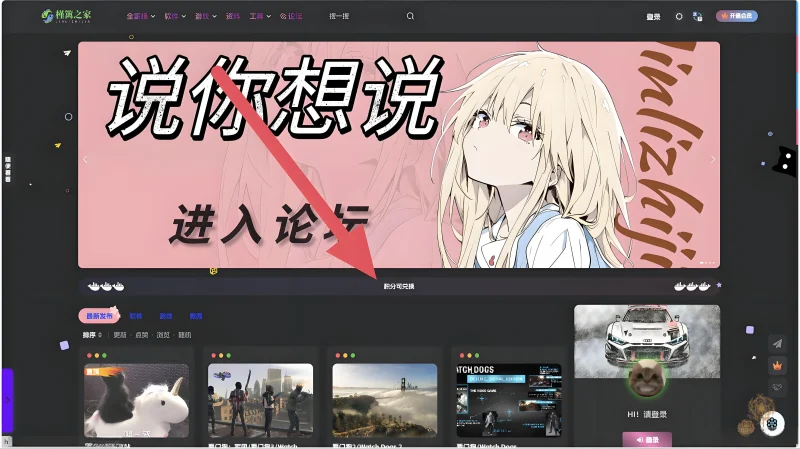



![图片[1]-夜间动态滚动公告-槿篱版(适合夜间深色主题)-奇想博客网](https://www.qxbkw.com/wp-content/uploads/2025/12/28f3c863a620251219212841-1024x575.webp)
注:本源码源自【槿篱博客 | 追求简约而不失深度的分享】原创提供。
1、将下面的代码放到:子比主题–>>自定义CSS样式!
/*自定义打字机公告*/
.file-format {
    padding: 0 20px;
    height: 38px;
    background: linear-gradient(224deg, rgba(255, 110, 144, .08), rgba(208, 147, 255, .08) 42%, rgba(105, 105, 255, .08) 100%, rgba(105, 105, 255, .08) 0);
    border-radius: 28px;
    display: flex;
    align-items: center;
    justify-content: center; /* 使内容居中 */
}
span.txt-file-format {
    font-size: 13px;
    font-weight: 700;
    color: unset;
    line-height: 18px;
    margin: 0 17px; /* 两边留出空间 */
}
.typed-cursor.typed-cursor--blink {
    animation: typedjsBlink 0.7s infinite;
    -webkit-animation: typedjsBlink 0.7s infinite;
}
@keyframes typedjsBlink {
    from { opacity: 0; }
    to { opacity: 1; }
}
@-webkit-keyframes typedjsBlink {
    from { opacity: 0; }
    to { opacity: 1; }
}
.file-format-icons {
    display: flex;
    align-items: center;
}
.left-icons {
    margin-right: auto; /* 使左边的图标靠左 */
    transform: scaleX(-1); /* 左边的图标左右翻转 */
}
.right-icons {
    margin-left: auto; /* 使右边的图标靠右 */
}
i.icon_ai[data-v-2775696c], i.icon_ps[data-v-2775696c], i.icon_3dMax[data-v-2775696c], i.icon_blender[data-v-2775696c], i.icon_c4d[data-v-2775696c], i.icon_cdr[data-v-2775696c] {
    width: 26px;
    height: 26px;
    display: inline-block;
    vertical-align: middle;
}
i.icon_sketch[data-v-2775696c] {
    width: 26px;
    height: 26px;
    display: inline-block;
    background: url(https://p.zhheo.com/20231108a540b2862d26f8850172e4ea58ed075102.png!cover) no-repeat 50% / 100%;
    vertical-align: middle;
}
i.icon_ps[data-v-2775696c] {
    background: url(https://p.zhheo.com/20231108a540b2862d26f8850172e4ea58ed075102.png!cover) no-repeat 50% / 100%;
}
i.icon_ai[data-v-2775696c] {
    background: url(https://p.zhheo.com/20231108a540b2862d26f8850172e4ea58ed075102.png!cover) no-repeat 50% / 100%;
}
i.icon_3dMax[data-v-2775696c] {
    background: url(https://p.zhheo.com/20231108a540b2862d26f8850172e4ea58ed075102.png!cover) no-repeat 50% / 100%;
}
i.icon_cdr[data-v-2775696c] {
    background: url(https://p.zhheo.com/20231108a540b2862d26f8850172e4ea58ed075102.png!cover) no-repeat 50% / 100%;
}
i.icon_c4d[data-v-2775696c] {
    background: url(https://p.zhheo.com/20231108a540b2862d26f8850172e4ea58ed075102.png!cover) no-repeat 50% / 100%;
}
2、将下面的代码放到:子比主题–>>自定义底部HTML代码!在这里可修改公告内容。
<!--自定义公告栏-->
<script>
    const texts = [
          "本源码由槿篱之家提供",
          "建议使用电脑访问",
          "积分通过签到获得",
          "积分可兑换会员",
          "更多精彩内容请关注:奇想博客网"
    ];
    const indexXtips = document.getElementById('index-xtips');
    let textIndex = 0;
    let charIndex = 0;
    let isDeleting = false;
    function typeWriter() {
        const currentText = texts[textIndex];
        const fullText = currentText.substring(0, charIndex);
        indexXtips.textContent = fullText;
        if (!isDeleting && charIndex < currentText.length) {
            charIndex++;
            setTimeout(typeWriter, 100); // 逐字显示的速度(毫秒)
        } else if (isDeleting && charIndex > 0) {
            charIndex--;
            setTimeout(typeWriter, 50); // 逐字回退的速度(毫秒)
        } else {
            isDeleting = !isDeleting;
            if (isDeleting) {
                setTimeout(typeWriter, 2000); // 每段文字显示完毕后的延迟(毫秒)
            } else {
                textIndex = (textIndex + 1) % texts.length; // 循环显示下一段文字
                charIndex = 0;
                setTimeout(typeWriter, 500); // 每段文字回退完毕后的延迟(毫秒)
            }
        }
    }
    // 确保 DOM 完全加载后再启动打字机效果
    document.addEventListener('DOMContentLoaded', () => {
        typeWriter(); // 开始打字机效果
    });
</script>
3、最后将下面的代码放到:外观–>>小工具–>>自定义HTML代码即可。
<!-- 自定义公告 -->
<div class="file-format" data-v-2775696c="">
    <span class="file-format-icons left-icons" data-v-2775696c="">
        <i class="icon_ps" data-v-2775696c=""></i>
        <i class="icon_ai" data-v-2775696c=""></i>
        <i class="icon_sketch" data-v-2775696c=""></i>
    </span>
    <span id="index-xtips" class="txt-file-format" data-v-2775696c=""></span>
    <span class="typed-cursor typed-cursor--blink" aria-hidden="true"></span>
    <span class="file-format-icons right-icons" data-v-2775696c="">
        <i class="icon_3dMax" data-v-2775696c=""></i>
        <i class="icon_cdr" data-v-2775696c=""></i>
        <i class="icon_c4d" data-v-2775696c=""></i>
    </span>
</div>
THE END




暂无评论内容